
Support
Owner's Manual & Use Guide
Hands-free illumination for the trail and beyond. Everything from first charge to trailhead — safety, setup, care, and support.
How to set up and attach your StrapLights®
Light modes
Prefer video? The walkthroughs above cover attachment and light modes. No app needed — just press play.
Contents
- 01Important Safety Information
- 02What's in the Box
- 03Product Overview
- 04Charging & Battery Care
- 05Power Button & Light Modes
- 06How to Attach to Your Pack
- 07Best Placement & Multi-Unit Setup
- 08Care, Cleaning & Storage
- 09Water & Weather Resistance
- 10Troubleshooting
- 11Intended Use
- 12Battery & Electronics Disposal
- 13Limited Warranty
- 14Shipping Policy
- 15Return & Exchange Policy
- 16Support & Manufacturer Information
Please read this entire guide before first use, and keep it for reference. StrapLights® is powered by a built-in rechargeable lithium polymer (Li-Po) battery — the same battery technology used in phones, headlamps, and other rechargeable lighting products. Li-Po batteries are safe when used and charged as directed, but like any rechargeable electronics they require sensible handling.
General Safety
- Fully charge before first use to establish accurate runtime and battery health.
- LEDs are bright — avoid direct eye exposure at close range.
- Not a toy. Keep away from young children and pets.
- Do not disassemble, puncture, crush, or modify the unit or battery.
- Do not expose to open flame, extreme heat, or full water immersion.
- Discontinue use if the housing, cable, or charging port is cracked or damaged.
Lithium Polymer Battery Precautions
- Charge only with the included USB-C cable or a certified cable and standard 5V USB source.
- Charge on a hard, non-flammable surface, within sight, at normal room temperature.
- Never charge a battery that is wet, frozen, or visibly swollen.
- Stop use and disconnect immediately if the unit is hot, smells odd, swells, or leaks.
- Store between roughly 50–77°F (10–25°C).
- Never incinerate the battery or dispose of it in household trash.
| Item | Description |
|---|---|
| StrapLights® Unit | 1 (or 2, if purchased as a pair) — rechargeable COB LED strap light |
| USB-C Charging Cable | 1 per unit — for charging from any standard 5V USB power source |
| Hook & Loop Straps | 3 pre-installed straps per unit for attaching to a backpack strap |
| Quick-Start / User Guide | 1 — printed insert; this document is the full extended manual |
Inspect all contents upon opening. If anything is missing or damaged, contact us at service@straplights.com.
StrapLights® combines a high-visibility COB LED floodlight strip with two forward-facing spot LEDs and an onboard control button, housed in a rugged, low-profile body designed to mount directly to a backpack strap.
Key Components
- COB LED strip — wide-angle flood illumination for visibility and area lighting
- Dual spot LEDs — focused forward-throw beam for path lighting
- Control button — power on/off and light mode cycling
- USB-C charging port — beneath the weather flap on the base of the unit
- Three Velcro mounting straps — top, middle, and bottom, pre-attached
How to Charge
- Open the charging port flap and plug in the included USB-C cable.
- Connect the other end to a certified USB-C cable/adapter or any standard 5V USB power source.
- Charge until the on-unit indicator shows a full charge.
- Disconnect and fully close the port flap before use outdoors.
Charge Time & Runtime
- Typical full charge time: 5–8 hours, depending on power source and battery condition.
- Runtime varies by light mode, brightness, and temperature — cold reduces runtime.
- Charge fully before first use and recharge promptly after each outing.
Maximizing Battery Life
- Avoid letting the battery sit fully discharged for long periods.
- Avoid storing the unit at full charge in hot environments (e.g., parked car).
| Action | Result |
|---|---|
| 1 click top button (from off) | Turns the unit COB and LED strip on |
| 2 clicks top button | Cycles to COB light only |
| 3 clicks top button | Cycles to LED white strip only |
| 4 clicks top button | Cycles to LED red strip |
| 5 clicks top button | Cycles to LED red strip strobe |
| 1–5 clicks lower button | Activates motion sensor on the selected light mode |
| Press and hold top button | Activates emergency blue and red flash on the controller box while selecting desired light mode |
| No response | Recharge fully, then try again — see Troubleshooting |
StrapLights® mounts to almost any backpack strap using its three pre-installed Velcro straps — no tools required.
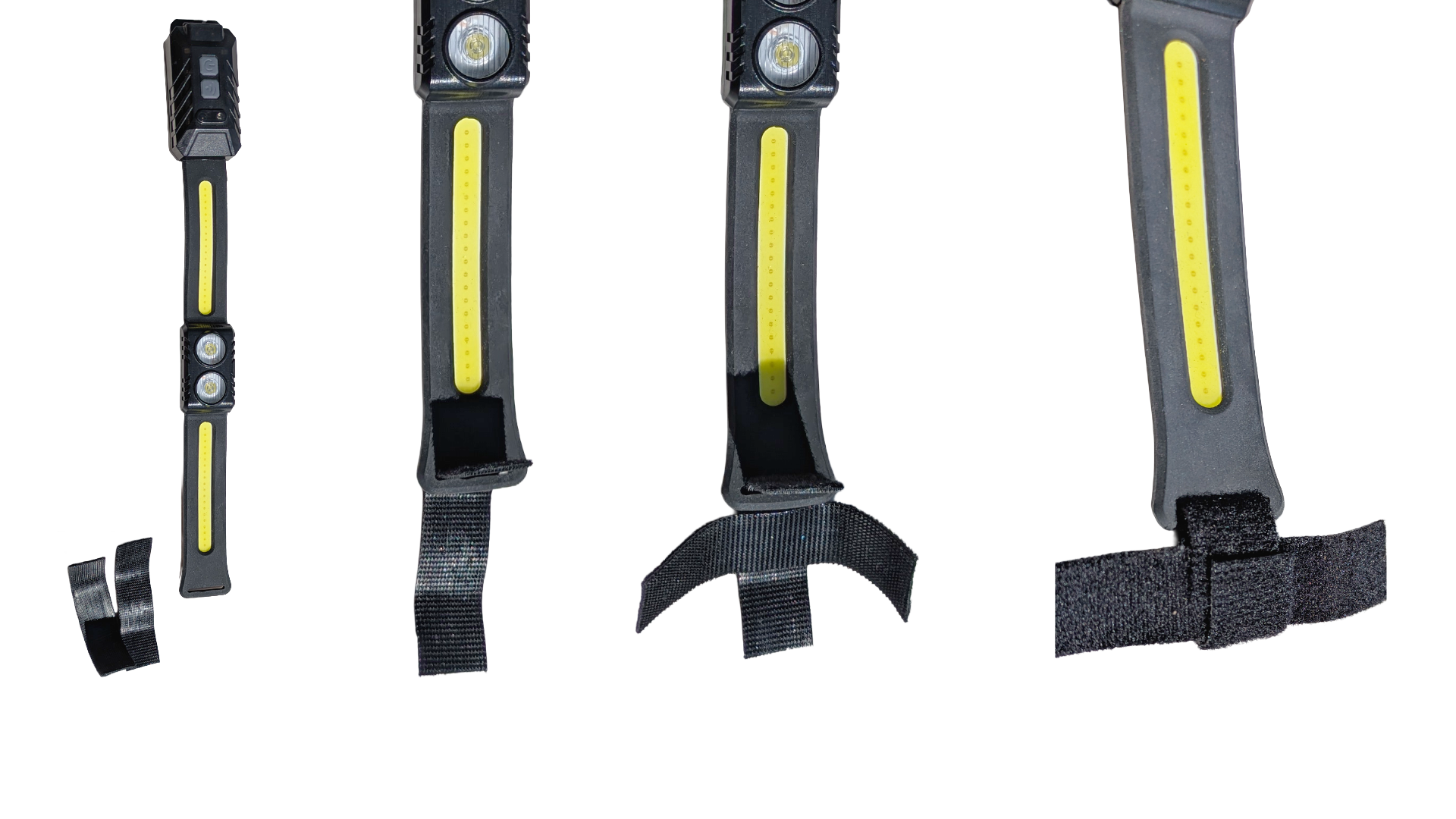
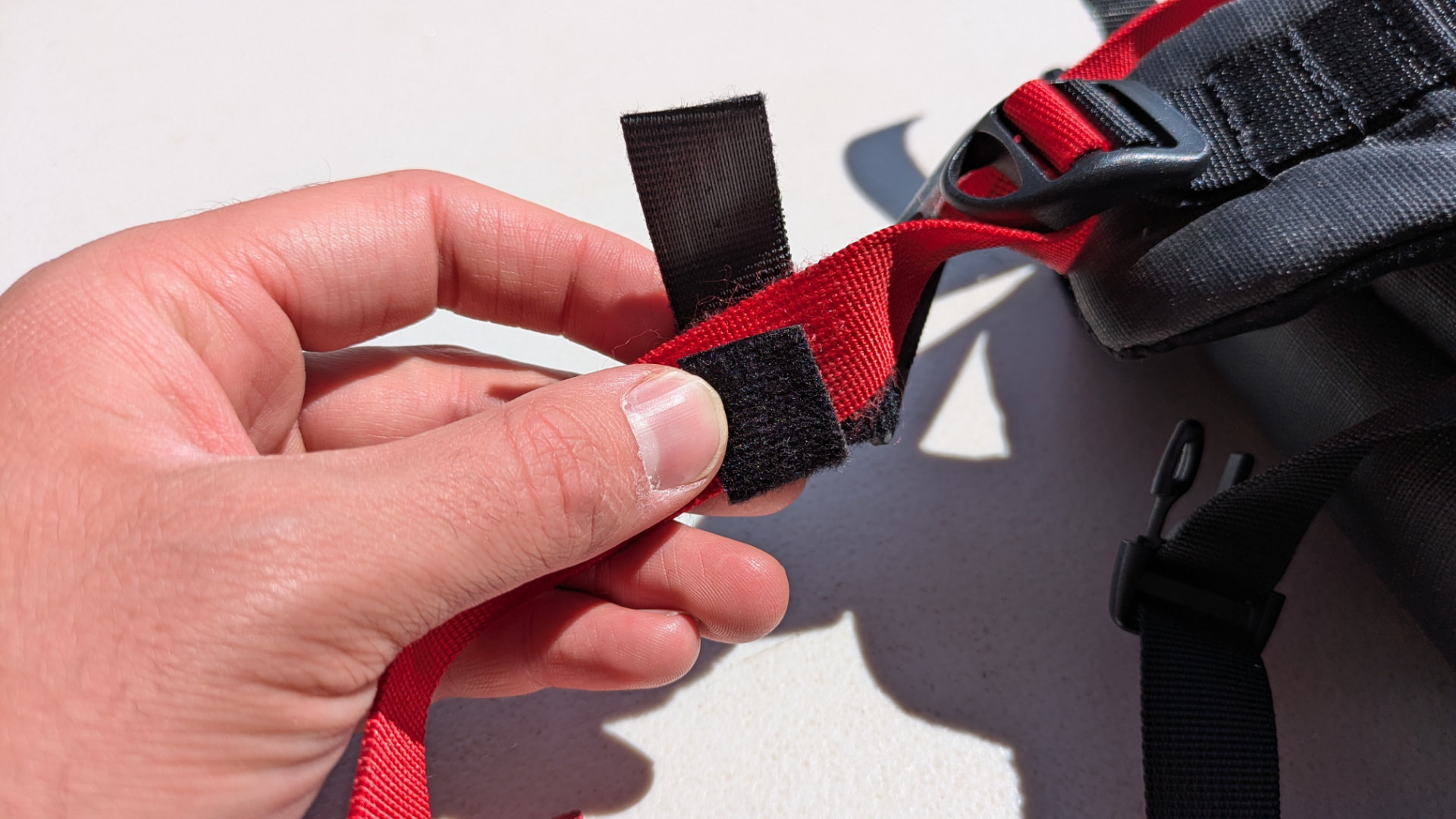
- Build the Bottom Loop. Slide one 3" Velcro piece through the silicone slot at the bottom of the StrapLight. Place a second 3" piece horizontally across the first to form a "T" shape. Fold the first piece over the horizontal piece and fasten it back onto itself to create a chain loop.
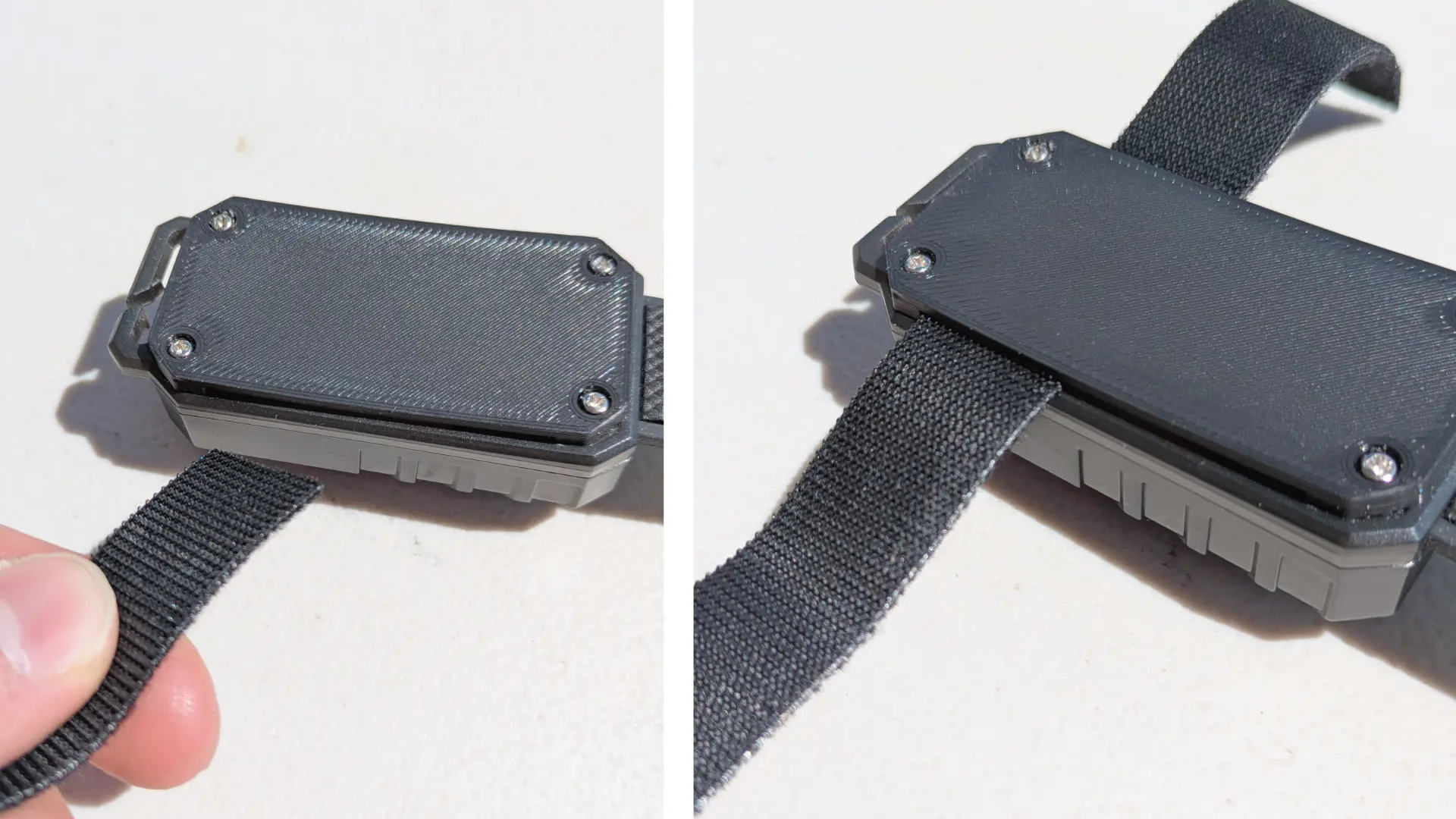
- Thread the Top Strap. Thread the 7" Velcro strap through the top and middle slots on the back of the StrapLight.
- Position the Light. Place the StrapLight on the front of your backpack strap roughly between your lower chest and waist. Wrap the horizontal bottom Velcro piece around the lower adjustment strap and press to fasten. Wrap and press all Velcro firmly around the backpack strap.
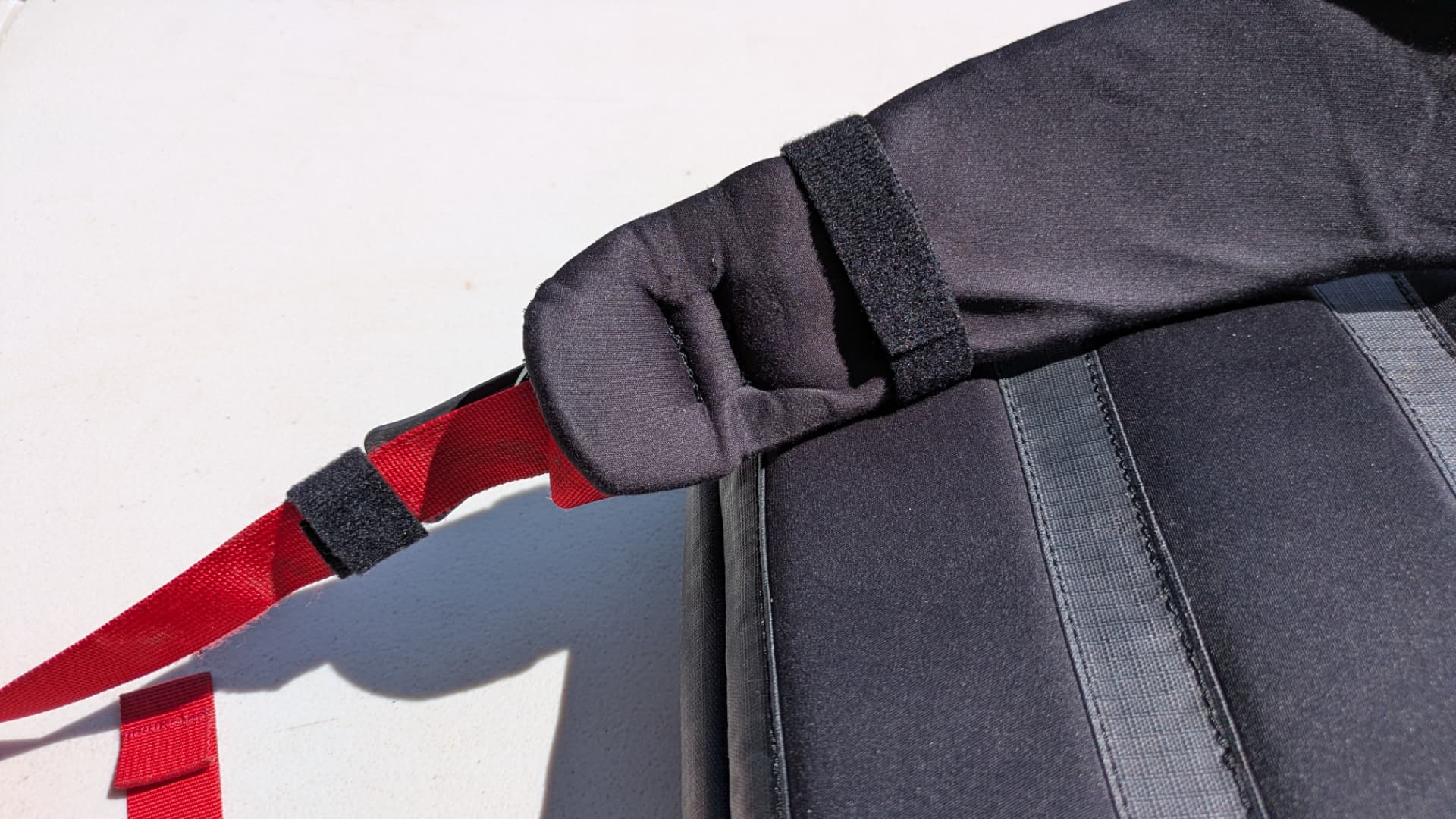
- Final Check. Give the light a gentle wiggle to ensure it is snug and secure. Re-tighten any straps if needed.
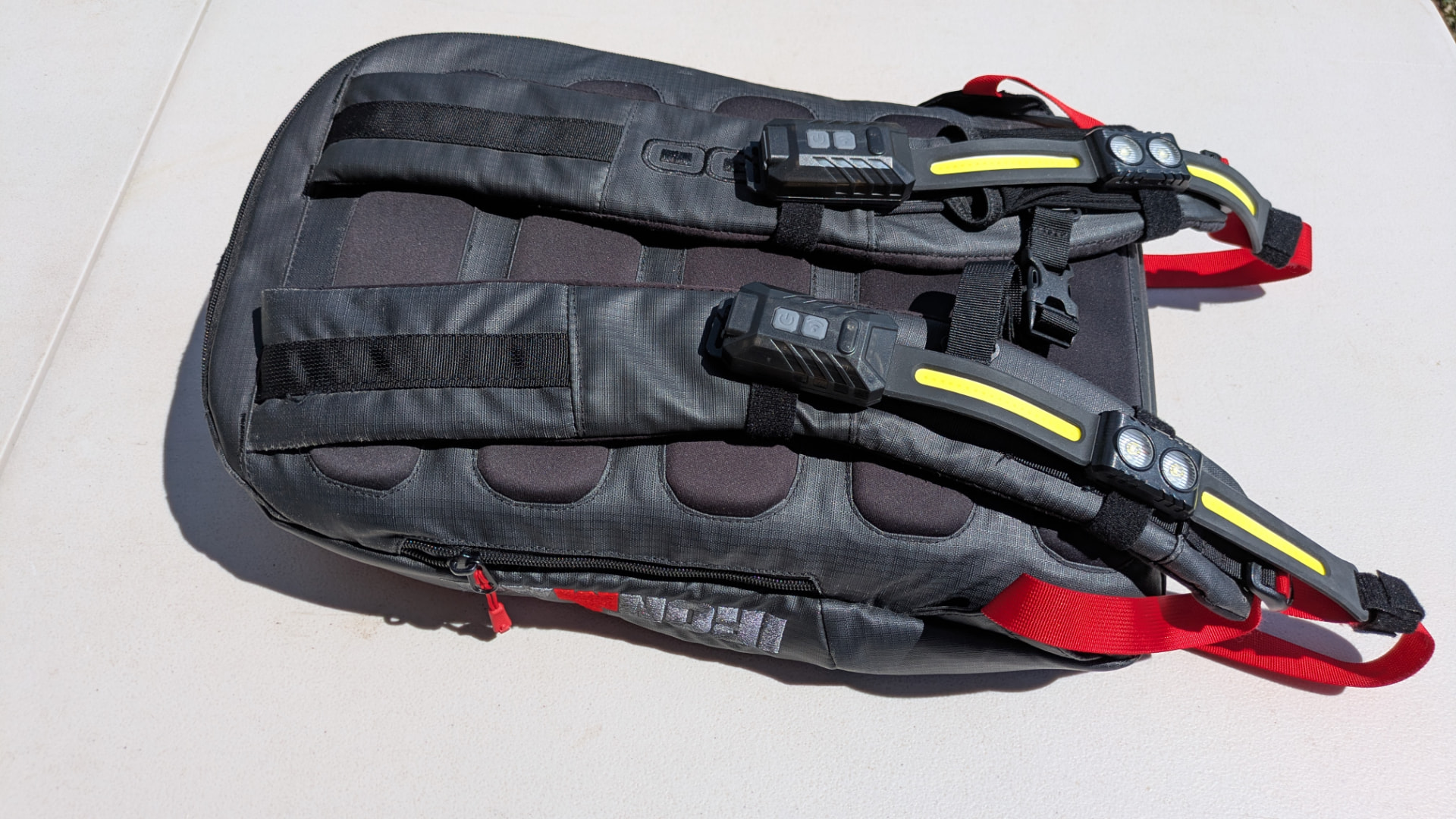
- Mount the lights lower to avoid light shining in your eyes.
- Mount each unit on the vertical front face of a shoulder strap for the most natural light throw.
- For best visibility, position the unit at or just below sternum height.
- If you own a pair, mount one unit per shoulder strap for balanced, symmetrical illumination.
Cleaning
- Wipe with a soft, dry or lightly damp cloth — no solvents, abrasives, or pressurized water.
- Let the unit dry completely before charging or storing it.
- Keep Velcro straps free of lint and debris for a strong, reliable hold.
Storage
- Store in a cool, dry place away from direct sunlight and open flame.
- If unused for an extended period, recharge every few months to preserve battery health.
- Do not store a unit with a damaged cable, housing, or battery.
Adjusting the Straps
- Unfasten Velcro straps carefully by peeling rather than tearing.
- If a strap is longer than needed, trim the excess and keep the cut edge neat.
- Unless a specific IP rating is stated on your packaging, treat the unit as splash-resistant only — not fully waterproof.
- Avoid heavy rain, puddles, and full water immersion unless your model's stated rating covers it.
- Always dry the unit completely before charging.
- If the unit gets wet, power it off, dry thoroughly, and inspect the port before reconnecting power.
| Issue | Try This |
|---|---|
| Light will not turn on | Charge fully · confirm the power button is pressed firmly · try a different certified cable/power source · inspect for damage |
| Unit will not charge | Confirm the cable is fully seated · try a different USB power source · check the port for debris |
| Light flickers or dims | Recharge · check for a loose or damaged cable · confirm the unit is securely mounted |
| Velcro is slipping | Reposition and press each strap firmly · clean the hook-and-loop surface · re-check mounting height |
| Unit is hot, swollen, or smells odd | Stop use · disconnect from power · do not open the unit · contact support |
- StrapLights® is intended for hands-free visibility and area illumination mounted on a backpack strap.
- It is not a substitute for required safety lighting such as bicycle, vehicle, or certified life-safety lights.
- Use only for its intended purpose and in line with Section 01.
- Do not dispose of StrapLights® in household trash — it contains a rechargeable Li-Po battery and electronics.
- Take the unit to a local battery/e-waste recycling location or a retailer that accepts rechargeable electronics.
- Follow all local, state, and national regulations for battery and e-waste disposal.
- If the battery appears damaged or swollen, follow local hazardous-waste guidance rather than standard recycling.
StrapLights® is covered by a 90-day limited warranty against manufacturing defects from the date of delivery.
What's Covered
- Manufacturing defects in materials or workmanship
- Items that arrive damaged or not working properly
- USB-C charging port, LED emitters, motion sensor, and strap hardware failures under normal use
Not Covered
- Misuse, accidental damage, or unauthorized modification
- Water immersion beyond the unit's stated rating
- Normal wear of straps or housing finish
- Damage from improper charging (uncertified cables/adapters)
- Loss or theft of the product
Keep your proof of purchase — it's required for all warranty claims.
All shipping is sent by USPS at the custom box rate. Any shipping damage or broken parts or products may be disputed with USPS or StrapLights®. Free shipping is available on every order.
We want you to love your StrapLights®. If something isn't right, we'll make it right.
30-Day Guarantee
Not completely satisfied? Return or exchange within 30 days of delivery — no questions asked. The item must be in its original condition (lightly used is okay) and you will need your order number or proof of purchase.
How to Start a Return or Exchange
- Email us at service@straplights.com with your order details, or use the contact page.
- Let us know if you would like a refund or exchange.
- We will send you a quick return shipping label and next steps.
Refunds
Once your return is received and inspected, we’ll issue your refund to your original payment method within 3–5 business days.
Exchanges
If you are swapping for a different StrapLights® product or a replacement, we’ll ship it out as soon as we receive your return.
Refunds, Exchanges & Damaged Items
- Refunds post to your original payment method within 3–5 business days of us receiving your return.
- Exchanges ship once we've received your returned item.
- Damaged or defective? Contact us within 10 days of delivery for a replacement.
- Website: straplights.com
- Email: service@straplights.com
- Setup help: scan the QR code in the printed manual, or watch the video at the top of this page.
Thank you for choosing StrapLights®! See you on the trail.